The contact panel — ad source, tags, deals, notes and history
Everything about the customer next to the chat — which ad they came from, their tags, deals, notes, other conversations and consent.
Who can do this: Everyone who can open the conversationPlan: All plans
The panel on the right of a conversation shows who you’re talking to. Toggle it with the panel icon in the thread header (Hide contact panel / Show contact panel).
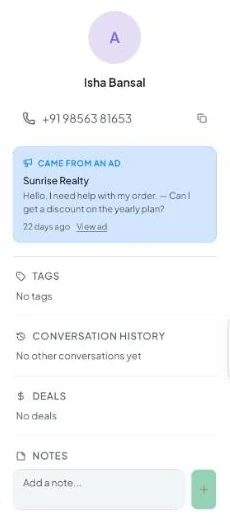
| Section | What it shows |
|---|---|
| Name and number | Click the copy icon to copy the number. |
| Came from an ad | Shown when the first message came from a Click-to-WhatsApp ad: the ad headline, text, when, and View ad. See Click-to-WhatsApp ad attribution. |
| Tags | The contact’s tags. Add or remove them on the contact page’s Tags tab. |
| Conversation history | Other conversations with this contact. |
| Deals | Open and closed deals linked to the contact. See Deals. |
| Notes | Contact notes visible to your team. See Internal notes. |
Consent banners
| Banner | Meaning |
|---|---|
| WhatsApp opt-out — “Customer requested messaging to stop. Sending is disabled.” | The customer replied STOP (or similar) or was marked opted out. Vatli blocks sends to them. If they write START, they’re opted back in. See Opt-outs and consent. |
| Contact blocked — “Outbound WhatsApp messages are disabled.” | Someone on your team blocked the contact. Unblock from the contact page. |
For the full record — custom fields, activity and every note — open the contact from Contacts. See Contact details.