Create and use quick replies
Save answers you send every day — plain text or a button message — and insert them from the composer in one click.
Who can do this: Create — Owner, Admin; Use — everyone who can replyPlan: All plans
Quick replies are reusable snippets that any agent can insert from the inbox. A quick reply can be plain text or a saved interactive message with buttons or a list.
Create a quick reply in Settings
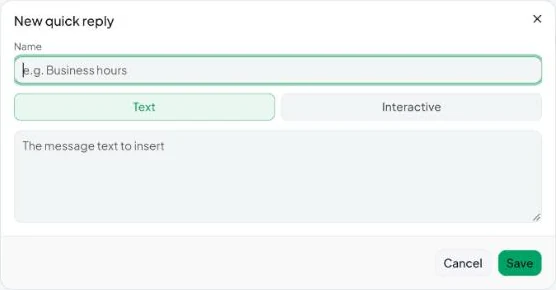
- Go to Settings → Quick replies and click New quick reply.
- Give it a name your team will recognise, such as Business hours or Bank details.
- Type the message text — or switch to an interactive message and build buttons or a list (see Send buttons and list menus).
- Save.
Save a reply you’ve just typed
- Type the message in the composer.
- Open the + menu and choose Save as quick reply.
- Enter a name when asked (“Name this quick reply:”). You’ll see “Saved as a quick reply.”
Insert a quick reply
- In a conversation with an open 24-hour window, click + → Quick replies.
- Pick the reply. It’s placed in the composer so you can tweak it before sending.
If the list says “No quick replies yet”, add some in Settings → Quick replies.
Quick replies are normal messages, so they only send inside the 24-hour window. To message someone outside it, use a template.