Check that your WhatsApp connection works
What the status cards in Settings → WhatsApp mean, what "Verify with Meta" checks, and the two-message test that proves everything works.
Who can do this: Owner or AdminPlan: All plansTime: 2 minutes
Go to Settings → WhatsApp. Two status cards at the top tell you whether the connection is healthy.
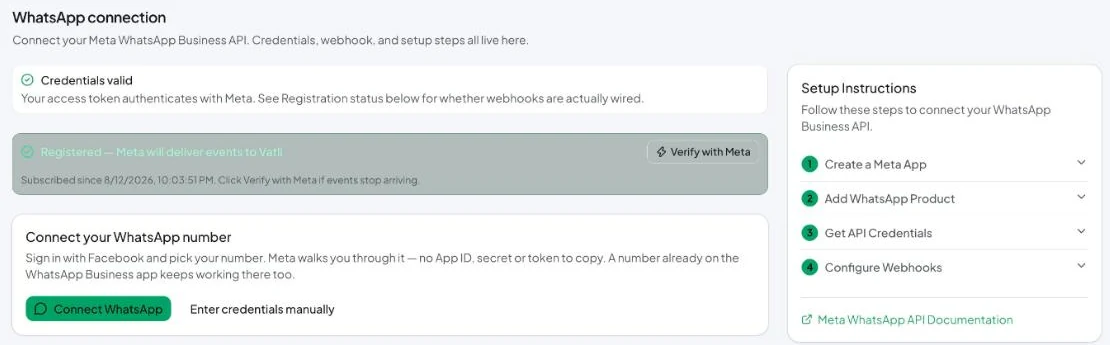
What the status cards mean
A healthy connection shows one green card — Registered — and a Manage connection row under it. A red Not Connected card appears above it only when something is wrong.
| Card | Meaning | If it’s not green |
|---|---|---|
| Not Connected (only when something is wrong) | Vatli can’t use the saved credentials. | “No WhatsApp configuration saved yet” — connect a number. “Stored token can’t be decrypted” — click Reset Configuration and connect again. Any other message is Meta’s error, shown as Meta sent it. |
| Registered — Meta will deliver events to Vatli | Your number is registered with the Cloud API and subscribed to Vatli, so incoming messages and delivery updates arrive. | “Registration failed — inbound events are not ready” — enter the number’s two-step PIN and save, or reconnect. |
| Subscribed since … | When the subscription was made. | If messages stop arriving, click Verify with Meta. |
Verify with Meta
Click Verify with Meta to run a live check against Meta. It looks at:
- that Vatli can read your phone number’s details,
- that your WhatsApp account is subscribed to the right app,
- the App ID / App Secret pair (manual connections),
- that the
messageswebhook field is subscribed, - your callback URL,
- whether the number is registered,
- when the last signed webhook and the last real customer message arrived.
Each check shows as passed or failed with the reason.
The two-message test
The only proof that matters is a real message in each direction:
- From your personal phone, send Hi to your business number. It should appear in the Vatli Inbox within a few seconds.
- Reply from the Vatli inbox. The reply should reach your phone and show a delivered tick in Vatli.
Testing from the same number that’s connected won’t work — WhatsApp doesn’t let a business number message itself (error 131021). Use a different phone.
Messages stopped arriving?
- Click Verify with Meta and fix any failed check.
- Manual connection? Check your Meta app’s webhook still points to Vatli’s callback URL and
messagesis subscribed. - Another tool may have claimed the number: if you recently tried a different provider with the same number, reconnect in Vatli.
- Still stuck — see Messages are not arriving in the inbox.