Connect HubSpot
Connect your HubSpot account in two clicks so HubSpot contacts, deals and meetings can trigger WhatsApp messages. Works on every HubSpot plan, including Free.
Who can do this: Owner and AdminPlan: Business and Enterprise (and the free trial)Need: A HubSpot user who can approve app accessTime: 2 minutes
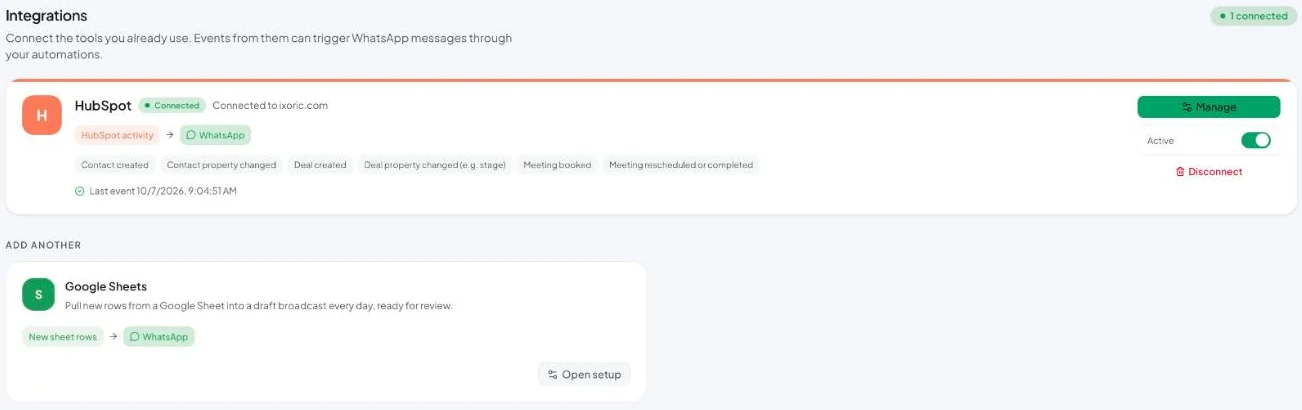
Connect
- Go to Integrations.
- On the HubSpot card, click Connect.
- HubSpot opens. Choose your HubSpot account (portal) and approve access.
- You’re sent back to Vatli and the card shows Connected with your HubSpot domain.
Vatli only asks HubSpot for read access. It never changes your HubSpot data.
The connection works on every HubSpot plan, including Free — it doesn’t need HubSpot workflows.
What you can do with it
| Feature | Guide |
|---|---|
| Start automations from HubSpot events | HubSpot triggers |
| Send a broadcast to a HubSpot list | Broadcast audience |
| Drip messages to a list until they book | Follow-up sequences |
| Confirm and remind HubSpot meetings | Demo booking reminders |
Manage the connection
- Active switch — pause all HubSpot events without disconnecting.
- Last event — when Vatli last heard from HubSpot. Useful to confirm it’s working.
- Manage — opens the HubSpot automation page.
- Disconnect — removes the connection. Automations that use HubSpot stop firing.
WhatsApp needs a phone number. HubSpot contacts without a phone number (with country code) are skipped.