The Ad attribution report
See which click-to-WhatsApp ads turned into deals and revenue — not just chats — and message the leads from your best ads.
Who can do this: Anyone who can open Ad attributionPlan: All plansNeed: Ads attribution switched on
Ads Manager can only see the click. Vatli follows the lead through to the deal.
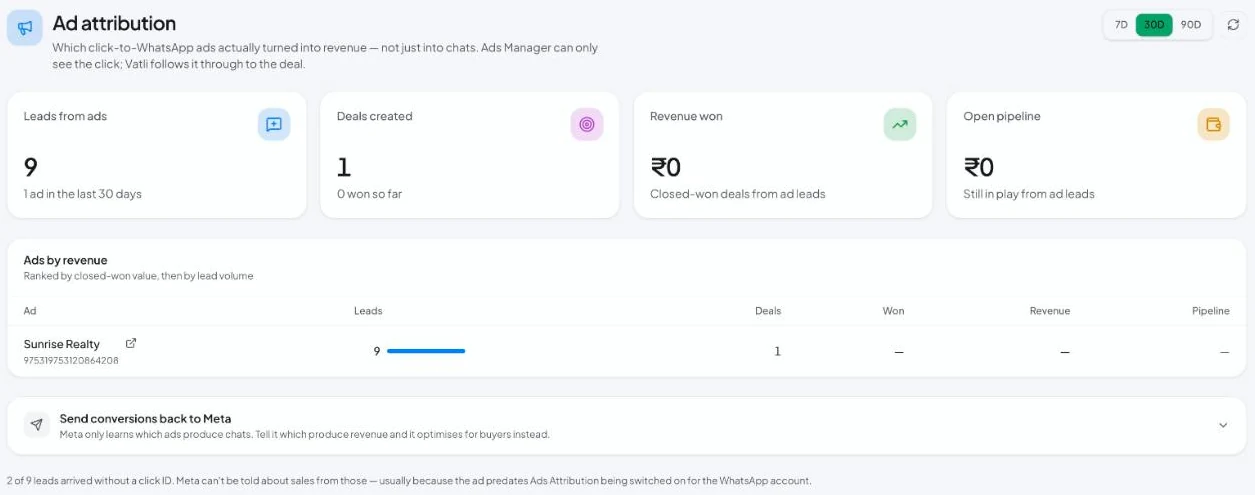
Read the report
Go to Ad attribution and pick 7D, 30D or 90D. Click the refresh icon to reload.
| Card | Meaning |
|---|---|
| Leads from ads | Contacts whose first message came from an ad in this period, and how many ads they came from |
| Deals created | Deals opened for those leads, and how many are won |
| Revenue won | Value of closed-won deals from ad leads |
| Open pipeline | Value of open deals from ad leads |
Ads by revenue ranks each ad by closed-won value, then by lead volume:
| Column | Meaning |
|---|---|
| Ad | Ad headline and Meta ad ID. The link icon opens the ad. |
| Leads | Contacts the ad brought in |
| Deals | Deals created for them |
| Won | Deals won |
| Revenue | Won value |
| Pipeline | Open deal value |
At the bottom, Vatli tells you how many leads arrived without a click ID — usually because the ad started before Ads attribution was switched on.
Act on it
- Scale the ads that make money, not the ones that only bring chats.
- Message the leads from one ad: in Broadcasts → New Broadcast → Audience, choose From a specific ad. See Choose your broadcast audience.
- Teach Meta what a sale looks like: send won deals back with the Conversions API.
Revenue uses the deal’s value in your account currency. Make sure your team logs deals for ad leads, otherwise ads that sell show ₹0.