Send won deals back to Meta (Conversions API)
Tell Meta which click-to-WhatsApp ads produce buyers, so its optimiser finds more of them instead of cheap chats.
Who can do this: Owner and AdminPlan: All plansNeed: Ads attribution on, a Meta dataset (pixel) and an access tokenTime: 10 minutes
Meta only learns which ads produce chats. When you report sales, it optimises for buyers instead. Vatli does this automatically: when a deal from an ad lead is won, it sends a conversion event to Meta.
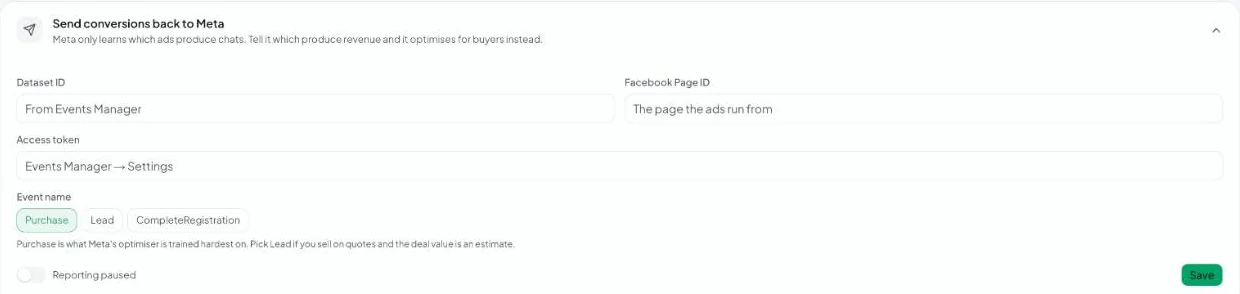
Set it up
- In Meta Events Manager, open (or create) the dataset you use for your ads and copy its Dataset ID.
- In the dataset’s Settings, generate an access token for the Conversions API.
- Find your Facebook Page ID — the Page your ads run from.
- In Vatli, go to Ad attribution and expand Send conversions back to Meta.
- Paste the Dataset ID, Facebook Page ID and Access token.
- Choose the Event name:
– Purchase — what Meta’s optimiser is trained hardest on. Best when deal values are real sales.
– Lead — pick this if you sell on quotes and the deal value is an estimate.
– CompleteRegistration. - Make sure reporting isn’t paused, then click Save.
How it works
- A conversion is sent when a deal linked to an ad lead is marked Won.
- Meta only attributes a conversion within 7 days of the ad click. Vatli doesn’t send later wins, because Meta would accept them and silently discard them.
- Temporary errors are retried a few times. A revoked token fails every time, so retries stop and the error stays visible.
- Use Reporting paused to stop sending without deleting your settings.
Use the same dataset (pixel) your ad set optimises for, then change the ad set’s optimisation event to the one you report — for example Purchase.