Connect Claude, ChatGPT or another AI assistant (MCP server)
Let an AI assistant answer questions from your real Vatli data through the read-only MCP server — masked, logged and revocable.
Who can do this: Any member can connect; data is limited to their own workspacePlan: All plansNeed: An assistant that supports remote MCP servers / custom connectors
Vatli runs a Model Context Protocol (MCP) server. Connect it to Claude, ChatGPT or any MCP client and ask questions like “Which leads from last week’s ad never replied?” — answered from your live workspace.
The connection is read-only: the assistant can’t send messages or change anything.
Server URL
https://app.vatli.co/mcp
It’s also shown, with a copy button, in Settings → AI connections.
Connect it in Claude
- In Claude, open Settings → Connectors → Add custom connector.
- Paste
https://app.vatli.co/mcpand add it. - Claude opens a Vatli page. Sign in if needed, choose what the assistant may read, and click Allow.
- The connection appears in Vatli under Settings → AI connections.
Other assistants call this a “remote MCP server” or “connector” — the steps are the same: paste the URL, sign in to Vatli, allow.
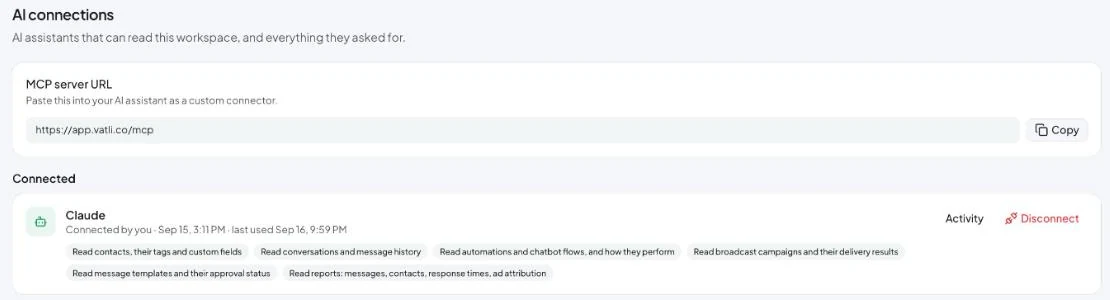
What the assistant can read
| Tool | Scope | Answers |
|---|---|---|
vatli_list_contacts |
contacts | Contacts by tag, date added, last activity, opt-out, lead source or ad |
vatli_get_contact |
contacts | One contact with tags, fields, conversations, deals and ad source |
vatli_search_conversations |
conversations | Conversations by status, date, tag, keyword, flow or agent |
vatli_get_conversation |
conversations | A conversation’s messages, including why failed messages failed |
vatli_list_flows |
flows | Flows and automations: trigger, on/off, how often they ran |
vatli_get_flow_stats |
flows | Runs, completions, drop-off and errors |
vatli_list_broadcasts |
broadcasts | Campaigns with sent, delivered, read and failed counts |
vatli_list_templates |
templates | Templates and approval status |
vatli_get_analytics |
analytics | Messages, new contacts, response times by day, week, source or tag |
vatli_get_ad_attribution |
analytics | Click-to-WhatsApp leads, conversions and revenue per ad |
Example questions
- “Summarise the open conversations nobody has answered since yesterday.”
- “Which of last month’s broadcasts had the worst read rate, and what did the template say?”
- “How many leads did each Facebook ad bring in this month, and how many became deals?”
- “List contacts tagged VIP who haven’t messaged in 30 days.”
Privacy and security
- Your workspace only. Every query is filtered to the workspace that approved the connection.
- Masked by default. Phone numbers show as
+91 •••••43210and emails asa•••@example.com, unless you tick full phone numbers and emails when connecting. - Short-lived tokens. Access tokens last 1 hour; refresh tokens 30 days and rotate on every use.
- Logged. Every request appears in Settings → AI connections with what was asked, kept for 90 days.
- Rate-limited to 100 reads a minute per connection.
- Instant revoke. Click Disconnect and the assistant is refused on its next request. Removing a teammate also disconnects every assistant they connected.